IOCs
- Domain (short links):
usatalent[.]site- Pattern:
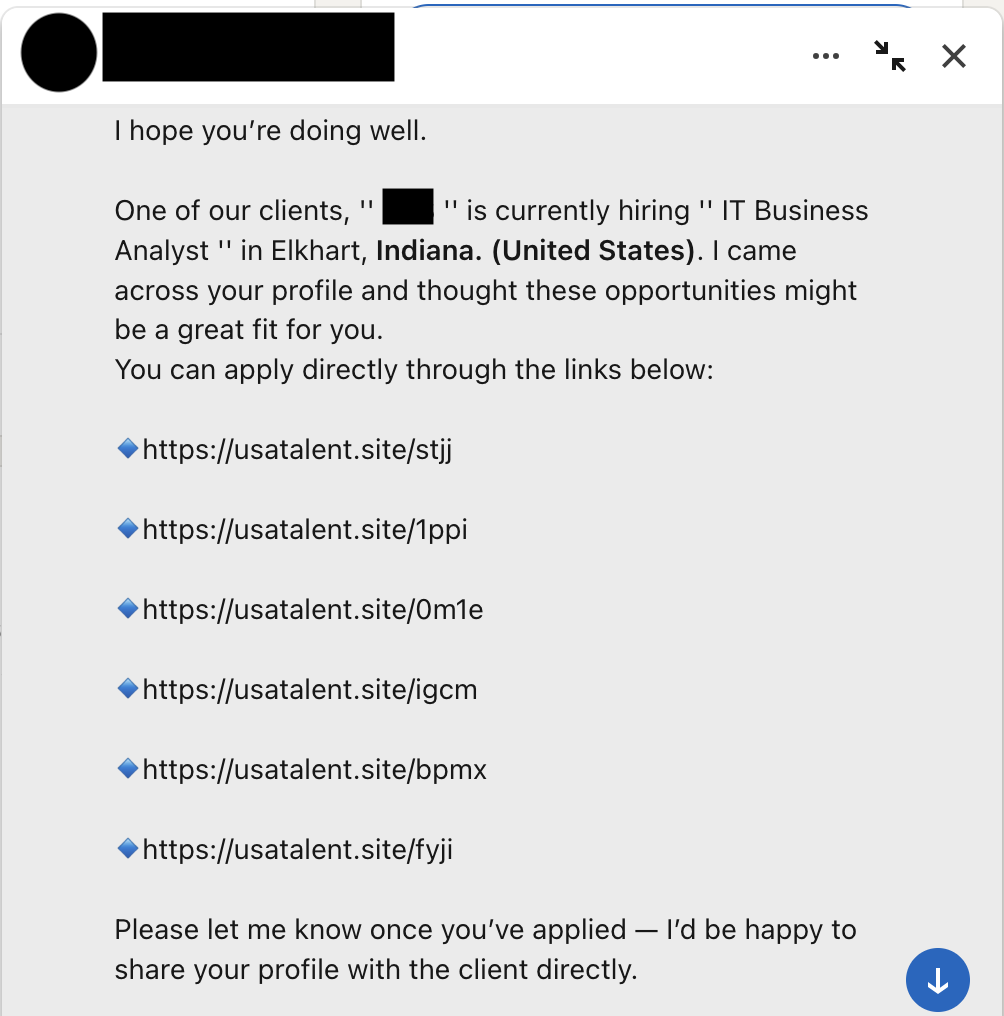
/<4-char-token>(stjj, 1ppi, 0m1e, igcm, bpmx, fyji)- Status: dead or parked at time of analysis
- Likely stack: WordPress (URL shortener behavior)
Identity Drift: Engineer → QA → Recruiter
What This Is
I got a LinkedIn DM from someone claiming to be a recruiter with “opportunities near me.” They sent six short links, all on the same domain.
What caught my eye was the profile itself. It felt like three different people glued together.
Why It Looked Off
Red flag 1: The headline. It was a wall of software engineering keywords. Not “recruiter,” not “talent,” just buzzwords stacked like someone was trying to show up in searches.

Red flag 2: The About section. It read like someone applying for a QA job. Generic “aspiring for a challenging job” language and awkward phrasing that didn’t match someone recruiting for roles.

Red flag 3: Current role. The current job listed was a booking clerk. Not recruiting. Not tech. Not even adjacent.
So I treated it like a mini incident and did safe link triage.
Context: Unsolicited DM with six short links. The profile context was mismatched across headline, about section, and current job.
Safety constraints
- No browser interaction with landing pages
- No JavaScript execution
- Headers only inspection via
curl -I - Preserve evidence even if the links are already dead
Reality check: By the time I looked, the redirect chain was already dead (404s and parked behavior). That does not make it useless. You can still capture indicators, document patterns, and preserve evidence for next time.
Environment
Setup
- Host: macOS
- Analysis VM: Kali Linux (VirtualBox, NAT)
- Evidence folder:
~/linkedin-recruiter/ - Link status: dead at time of analysis
Why investigate dead links? Because this stuff repeats. Different domain, same move. Having a baseline makes the next one faster.
1. Save The Links (Defanged)
First step: capture what you have without making anything clickable.
mkdir -p ~/linkedin-recruiter && cd ~/linkedin-recruiter

cat > urls.txt << 'EOF'
hxxps://usatalent[.]site/stjj
hxxps://usatalent[.]site/1ppi
hxxps://usatalent[.]site/0m1e
hxxps://usatalent[.]site/igcm
hxxps://usatalent[.]site/bpmx
hxxps://usatalent[.]site/fyji
EOF
Pattern: same domain, same token length, multiple links in one message. This is not normal recruiting behavior.
2. DNS Sanity Check (Passive)
Before touching the links, see what DNS says.
domain="usatalent.site"

dig +short A "$domain"   | tee -a dns_enum.txt
dig +short AAAA "$domain" | tee -a dns_enum.txt
dig +short NS "$domain"  | tee -a dns_enum.txt
If the domain does not resolve, you are done fast. If it does resolve, keep going.
3. Capture Redirect Headers (Headers Only)
This is the core workflow. Follow redirects without rendering anything.
# Start a timestamped transcript
script -q -t 2>terminal_timing.txt terminal_transcript.txt

# Follow redirects (HEAD only)
while read -r u; do
  real="$(echo "$u" | sed -E 's#^hxxp(s?)://#http\1://#; s/\[\.\]/\./g')"
  echo -e "\n===== $u =====" | tee -a headers.txt
  curl -sSIL --max-time 15 --max-redirs 10 "$real"     | sed -n '1,60p'     | tee -a headers.txt
done < urls.txt

exit
Result: all six links returned 404s or empty responses. The campaign was dead by the time I checked, but the evidence trail is captured.
4. Quick Tech Fingerprint (Still Passive)
If the domain responds at all, grab basic fingerprints. No crawling, no interaction.
whatweb -a 3 "https://usatalent.site" | tee -a facts.txt
In my case, the behavior looked like a WordPress site with short link mechanics.
5. Preserve Evidence (Hash + Bundle)
Hash everything, then bundle it into one portable archive.
find . -maxdepth 1 -type f -print0   | xargs -0 sha256sum   | tee evidence_backup_SHA256.txt

tar -czf "evidence_backup_12212025.tar.gz"   dns_enum.txt headers.txt urls.txt facts.txt   terminal_transcript.txt terminal_timing.txt   evidence_backup_SHA256.txt
6. Copy Evidence Out (VM → Host)
If you use a VirtualBox shared folder:
cp evidence_backup_*.tar.gz /media/sf_VMShare/
cp evidence_backup_SHA256.txt /media/sf_VMShare/
Now you can shut down the VM and still have everything you need for a write up.
Findings
What I can say confidently
- Multiple short links from the same domain in one DM
- Domain behavior looked dead or parked during analysis
- WordPress style short link behavior (common in disposable redirect infrastructure)
- Profile context mismatch: engineering headline, QA style about section, unrelated current role
What I cannot prove (because the chain was dead)
- Final landing behavior
- Full redirect chain during active campaign
- Whether it was credential harvest, malware delivery, or just data collection
MITRE ATT&CK mapping (high level)
- T1566.002 Spearphishing Link
- T1583.001 Acquire Infrastructure
- T1598.003 Spearphishing via Service (LinkedIn)
If This Hit Production
Block
usatalent[.]siteat DNS or proxy- Flag messages with 3+ short links from the same domain (low effort, decent signal)
Hunt
- Search proxy logs for
usatalent.site - Check if the same domain shows up in email or other messaging platforms
Detect
- Alert on short link patterns in external messages, especially multiple in one thread
- Add “profile mismatch” as an analyst note, not a detection rule
What I Would Do Next Time
- Screenshot the entire profile early (before it disappears)
- Check historical context on VirusTotal, urlscan, archive.org
- Automate: defang + HEAD follow + IOC summary into a single script
Key Takeaways
- Multiple short links from the same domain in a single DM is a big red flag
- Profile context matters: headline, about section, and current role should line up
- Dead links can still be worth documenting for patterns and repeatability
- HEAD requests get you what you need without touching the content
Commands (Copy/Paste)
mkdir -p ~/linkedin-recruiter && cd ~/linkedin-recruiter

cat > urls.txt << 'EOF'
hxxps://usatalent[.]site/stjj
hxxps://usatalent[.]site/1ppi
hxxps://usatalent[.]site/0m1e
hxxps://usatalent[.]site/igcm
hxxps://usatalent[.]site/bpmx
hxxps://usatalent[.]site/fyji
EOF

domain="usatalent.site"
dig +short A "$domain"   | tee -a dns_enum.txt
dig +short AAAA "$domain" | tee -a dns_enum.txt
dig +short NS "$domain"  | tee -a dns_enum.txt

script -q -t 2>terminal_timing.txt terminal_transcript.txt
while read -r u; do
  real="$(echo "$u" | sed -E 's#^hxxp(s?)://#http\1://#; s/\[\.\]/\./g')"
  echo -e "\n===== $u =====" | tee -a headers.txt
  curl -sSIL --max-time 15 --max-redirs 10 "$real" | sed -n '1,60p' | tee -a headers.txt
done < urls.txt
exit

whatweb -a 3 "https://usatalent.site" | tee -a facts.txt

find . -maxdepth 1 -type f -print0 | xargs -0 sha256sum | tee evidence_backup_SHA256.txt
tar -czf "evidence_backup_12212025.tar.gz" dns_enum.txt headers.txt urls.txt facts.txt terminal_transcript.txt terminal_timing.txt evidence_backup_SHA256.txt

cp evidence_backup_*.tar.gz /media/sf_VMShare/
cp evidence_backup_SHA256.txt /media/sf_VMShare/
Seen similar LinkedIn tactics? me@heyosj.com