IOCs
- Short link:
forms[.]gle/pAWTomyUCG9xgZga8- Redirect target:
docs[.]google[.]com/forms/d/e/1FAIpQLScJCV6hs4UX8IVdHI61jrHLjlwxBtu5h5Oj8o31RiY7MaiM9Q/viewform- Outlook Safe Links host:
nam12[.]safelinks[.]protection[.]outlook[.]com- Current state: taken down (403, policy violation page)
TL;DR
Phishing email impersonating IT claimed my school email would be terminated unless I verified credentials immediately. Link wrapped in Outlook Safe Links redirected to a Google Form requesting email + password in plaintext. Security initially flagged as legitimate. After I challenged the assessment, manual review confirmed phishing. Form was taken down by Google for policy violations shortly after.
Why this matters: Google Forms credential harvesting is trivial to create, hard to detect automatically, and bypasses many email filters because the platform itself is trusted.
The Setup
I got an email saying my school email account was about to be terminated unless I verified immediately.
Security initially said it looked legit. I said no chance.
After a manual review they came back and confirmed it was phishing.
The funniest part is the phish was not even subtle. The link led to a Google Form asking for passwords in plain text. Not SSO. Not a sign in page. A form.
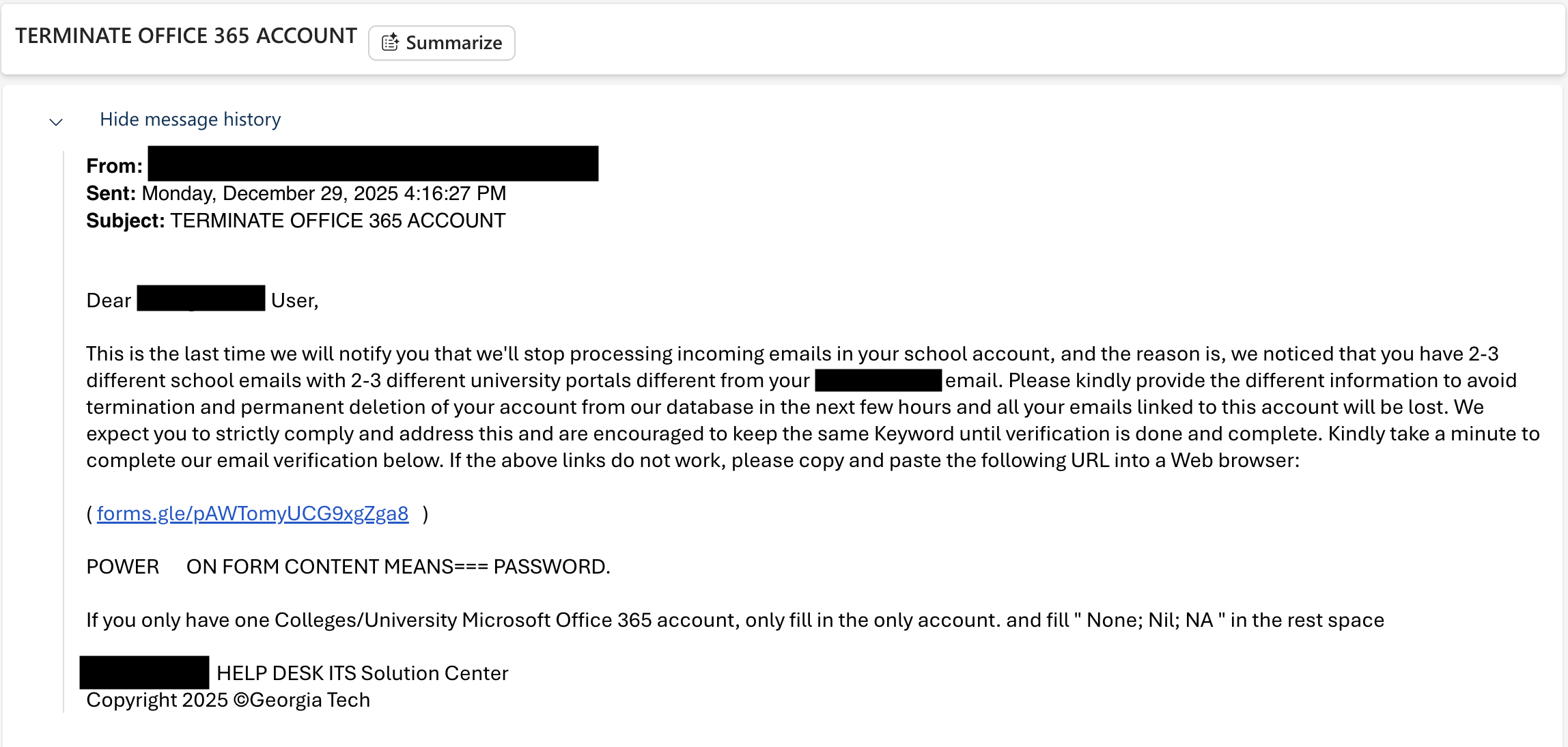
Initial Red Flags
What made me suspicious before clicking anything:
Urgency language: "TERMINATE OFFICE 365 ACCOUNT" in all caps
External form for credentials: No legitimate IT workflow uses Google Forms for password verification
Immediate action required: Classic pressure tactic
The decisive indicator:
When I saw the link destination was a Google Form, that was game over. No organization requests credentials via third-party forms. Ever.
The Follow-Up: Escalating Urgency
After the initial email, the attacker sent a second message ramping up the pressure.
The first email said "verify soon or we'll terminate your account."
The second email said "we are deleting it now unless you act immediately."
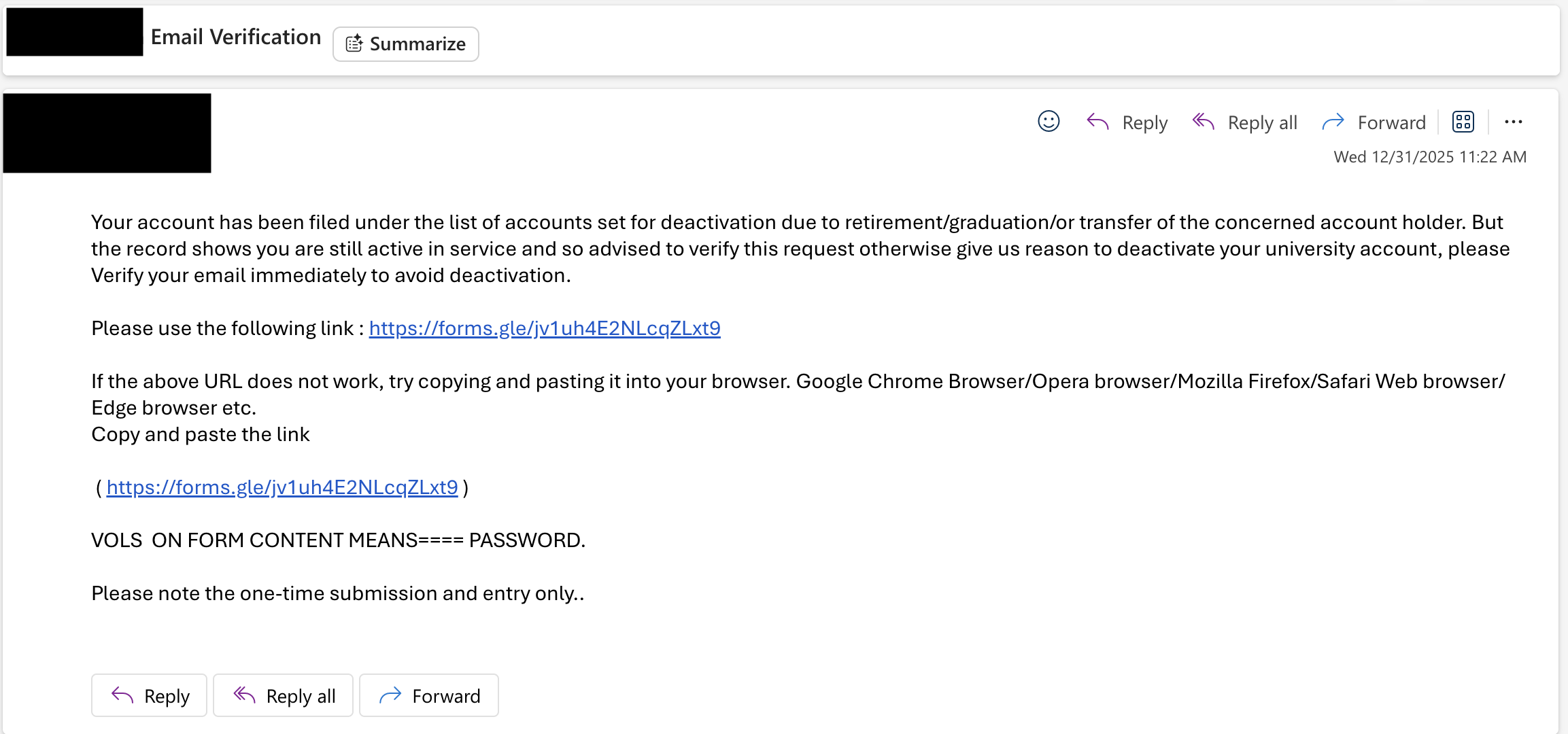
This is textbook social engineering escalation:
- create artificial scarcity (time running out)
- amplify consequences (deletion vs termination)
- eliminate thinking time (NOW vs soon)
- trigger panic response over rational analysis
Why this matters: Most people who ignored the first email might panic and click the second one. The attacker knows the first round captures the impulsive clickers. The second round targets the cautious people who initially hesitated.
This two-email pattern is common in credential phishing campaigns. If you see similar language patterns from the same sender within hours or days, that is a strong indicator of compromise or coordinated phishing.
What This Is
This is a credential harvest dressed up as an account termination notice.
The flow was simple.
- scare you with termination or deletion language
- push you to a link fast
- collect credentials in a Google Form
- push "act now" so verification doesn't happen
Why it works:
- Google Forms is a trusted domain (bypasses many filters)
- No malware, no suspicious files (just a form link)
- Outlook Safe Links wrapping makes it look "verified"
- People trust automated security checks
By the time I went back to poke around more, Google had already pulled it down. So this write up is about preserving what mattered while it was still fresh.
Environment
Setup
- Host: macOS
- Analysis VM: Kali Linux (VirtualBox, NAT)
- Evidence folder:
~/case_phish/
Safety constraints
- no submission
- no login
- header only where possible
- preserve artifacts fast
1. Preserve The Email
First thing I did was save the message as an .eml and hash it. This is a practice I have been wanting to get better about as I move into more malware analysis.
mkdir -p ~/case_phish/evidence ~/case_phish/output

cd ~/case_phish/evidence
sha256sum "Re_ TERMINATE OFFICE 365 ACCOUNT.eml" | tee ../output/eml_sha256.txt
md5sum "Re_ TERMINATE OFFICE 365 ACCOUNT.eml" | tee ../output/eml_md5.txt
wc -l "Re_ TERMINATE OFFICE 365 ACCOUNT.eml" | tee ../output/eml_linecount.txt
2. Capture The Redirect Chain (Headers Only)
The email link was wrapped in Outlook Safe Links, but the real destination was a Google Forms short link.
I did header only resolution to capture the redirect target without rendering anything.
curl -sSIL --max-redirs 10 --max-time 20 "https://forms.gle/pAWTomyUCG9xgZga8"   | tee ~/case_phish/output/forms_redirect.txt

grep -iE '^(HTTP/|location:)' ~/case_phish/output/forms_redirect.txt
Result
302to a Google FormsviewformURL- shortly after, a
403
3. Preserve The Takedown Page
When I tried to access the form later, Google returned a policy enforcement page.
This is the exact line I captured:
You can't access this item because it is in violation of our
That page is worth preserving because it confirms the platform itself disabled the content.
FORM="https://docs.google.com/forms/d/e/1FAIpQLScJCV6hs4UX8IVdHI61jrHLjlwxBtu5h5Oj8o31RiY7MaiM9Q/viewform?usp=send_form"

curl -sS --max-time 20 "$FORM"   > ~/case_phish/output/google_violation_page.html

grep -oE "You can't access this item[^<]*" ~/case_phish/output/google_violation_page.html | head -n 1
4. What Would Have Happened If You Submitted It
Google Forms responses go to the form owner. Often there is a linked Google Sheet behind the scenes.
So if someone typed credentials into that form:
- attacker receives them immediately
- next move is M365 sign in attempts
- then you get the usual chain: mailbox access, forwarding rules, internal phishing
The likely attack chain:
Immediate (Minutes):
- Attacker receives plaintext email + password via Google Forms response
- Attempts M365 login (often succeeds if no MFA)
- If MFA enabled, may attempt push notification fatigue attacks
Short-term (Hours):
- Mailbox access granted
- Attacker sets up forwarding rules (to exfiltrate future emails)
- Searches mailbox for sensitive data (SSN, financial info, internal docs)
- Sends internal phishing from compromised account (higher trust)
Medium-term (Days):
- Business Email Compromise (BEC) - impersonates user to request wire transfers
- Lateral movement - uses trust relationships to phish colleagues
- Data exfiltration - downloads sensitive files from SharePoint/OneDrive
Why Google Forms?
- Responses go to attacker's Google Sheet immediately
- No infrastructure to maintain (Google hosts it)
- Trivial to create, harder to trace
- Platform trust bypasses suspicion
I cannot determine the number of victims from local artifacts alone. That requires internal mail telemetry. What I can say confidently:
- anyone who received the email was targeted
- anyone who submitted credentials is at risk
Email Analysis
I preserved the full email headers but didn't have time to do deep infrastructure analysis before the form was taken down.
What I would expect to find:
- SPF/DKIM likely passes (sender was probably a compromised legitimate account)
- This is more effective than spoofing because it bypasses email authentication
- Compromised employee accounts are gold for attackers - pre-authenticated, trusted senders
What I captured:
- Sender appeared to be internal or from a trusted domain (likely compromised)
- Outlook Safe Links wrapped the URL (so it passed initial automated checks)
- No obvious header red flags that would trigger automated filters
This is why it got past initial review. The email itself looked clean. The problem was the destination - a Google Form asking for credentials.
The Evidence Trail
Initial report + security's first response:
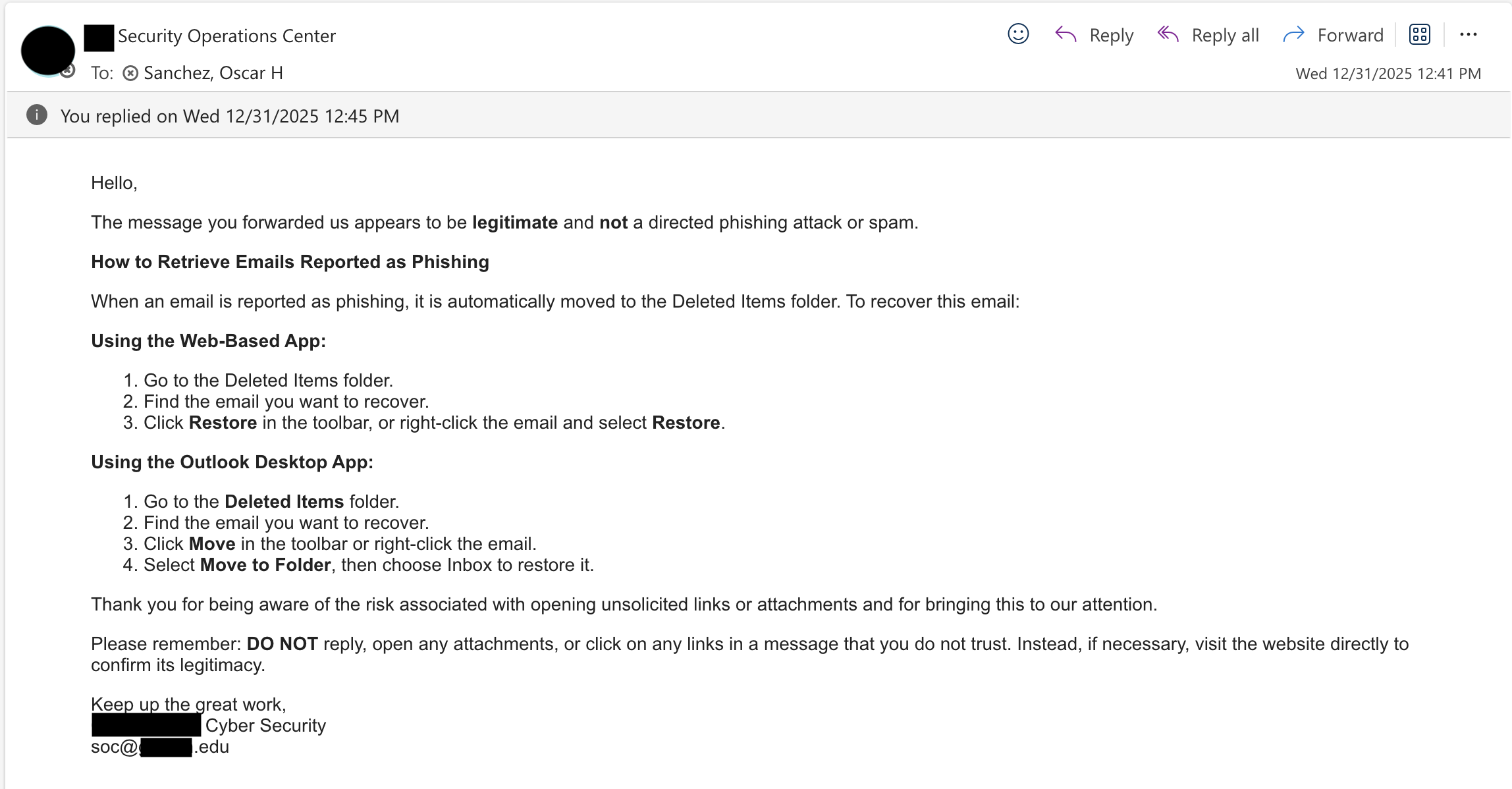
Note: Automated checks passed, but credential collection method was ignored
My pushback:
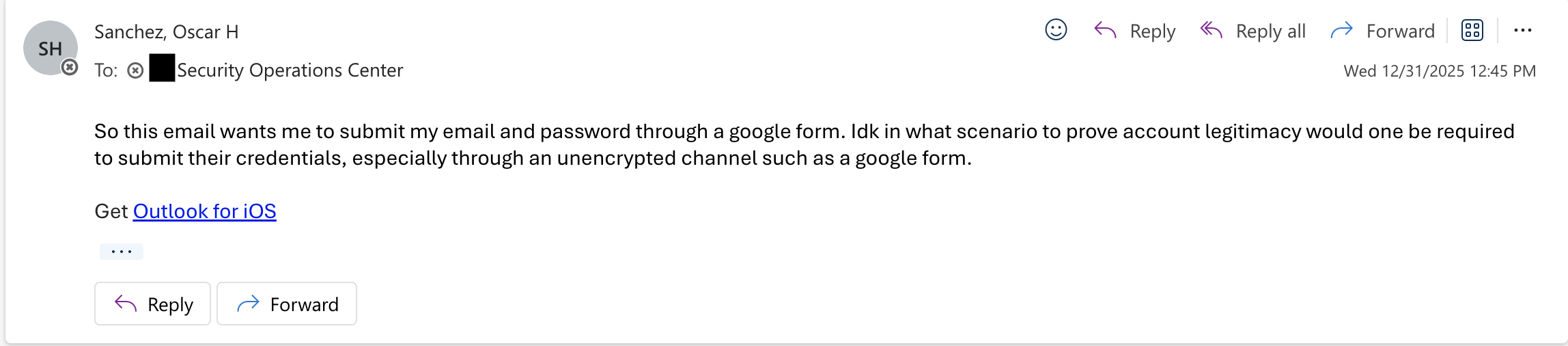
I pushed back specifically on Google Forms for credential collection
Confirmation after manual review:
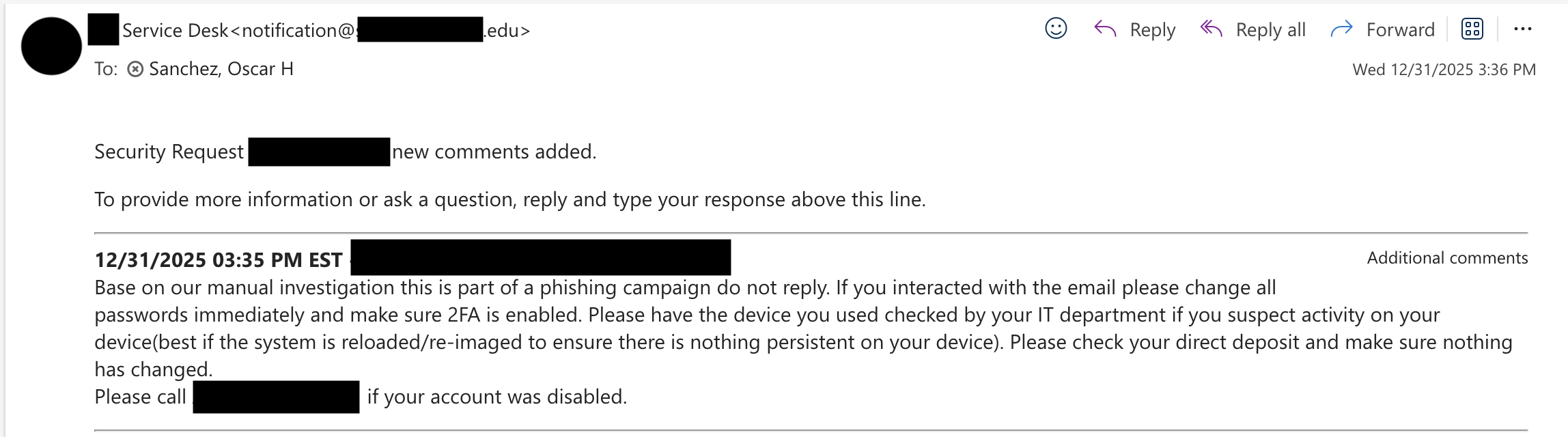
Manual investigation confirmed malicious - campaign shut down
Key Findings
Confirmed:
Email used urgency and termination language
Link redirected to Google Forms credential collection
Google blocked form for policy violations
Security confirmed phishing after manual review
Likely sent from compromised legitimate account (passed email authentication)
Unable to determine:
Total recipients (requires mail server logs)
Click-through rate
Number of credential submissions
Exact form fields (taken down before full capture)
Original compromised account details
Impact: Campaign shut down within days of initial report. Unknown number of potential victims, but risk mitigated before widespread compromise.
If This Hit Production
Block
forms[.]glelinks paired with termination language should always get human review- block the specific short link and final form URL where possible
Hunt
- search logs for the form ID
- search mail logs for the subject pattern and Safe Links URL
- look for other emails from the same sender (if account was compromised)
Detect
- alert on emails that pair "account termination" language with external form links
- flag any message asking users to submit passwords outside the official SSO flow
- monitor for credential stuffing attempts against M365 after form submission times
Lessons Learned
What I did right:
- Trusted fundamental security principles (no creds via forms)
- Preserved evidence immediately before takedown
- Challenged initial assessment with specific reasoning
- Documented methodology for repeatability
What I'd do differently next time:
- Capture full form HTML before submission (I missed the window)
- Do more thorough email header analysis upfront
- Check VirusTotal / URLScan for related infrastructure
- Set up automated artifact collection script for faster preservation
For defenders:
- Automated checks miss context (Google Forms = trusted, but not for passwords)
- Compromised accounts bypass email authentication (SPF/DKIM passes)
- User reports are valuable - encourage reporting over clicking
- Simple social engineering (urgency + trusted platform) still works
- Takedowns happen fast - preserve early
For users:
- If it asks for your password, it's phishing (SSO or nothing)
- Urgency = red flag (real IT gives advance notice)
- Verify through separate channel (don't reply to suspicious emails)
- When in doubt, report
Key Takeaways
- Safe Links wrapping does not mean safe. It means rewritten.
- A Google Form asking for passwords is not a workflow. It is a credential harvest.
- Preserve artifacts early. These get taken down fast.
- Compromised legitimate accounts are more dangerous than spoofed ones - they pass authentication checks.
Commands
mkdir -p ~/case_phish/evidence ~/case_phish/output

sha256sum "Re_ TERMINATE OFFICE 365 ACCOUNT.eml" | tee ~/case_phish/output/eml_sha256.txt
md5sum "Re_ TERMINATE OFFICE 365 ACCOUNT.eml" | tee ~/case_phish/output/eml_md5.txt
wc -l "Re_ TERMINATE OFFICE 365 ACCOUNT.eml" | tee ~/case_phish/output/eml_linecount.txt

curl -sSIL --max-redirs 10 --max-time 20 "https://forms.gle/pAWTomyUCG9xgZga8"   | tee ~/case_phish/output/forms_redirect.txt

grep -iE '^(HTTP/|location:)' ~/case_phish/output/forms_redirect.txt

FORM="https://docs.google.com/forms/d/e/1FAIpQLScJCV6hs4UX8IVdHI61jrHLjlwxBtu5h5Oj8o31RiY7MaiM9Q/viewform?usp=send_form"
curl -sS --max-time 20 "$FORM" > ~/case_phish/output/google_violation_page.html
grep -oE "You can't access this item[^<]*" ~/case_phish/output/google_violation_page.html | head -n 1
Seen similar email tactics? me@heyosj.com